The product
A tireless security reviewer for your codebase.
Dokima reviews your source code the way a dedicated security team would: it builds deep context on your repositories, hunts for vulnerabilities with specialised lenses, and validates every finding before it reaches your report. It keeps running as your code changes, powered by the AI subscription you already have.
A working product view
The current review state stays visible.
The real terminal dashboard shows the selected workspace, repository, component, runner and next scheduled work. This capture uses demonstration data, not a customer workspace.
See the setup path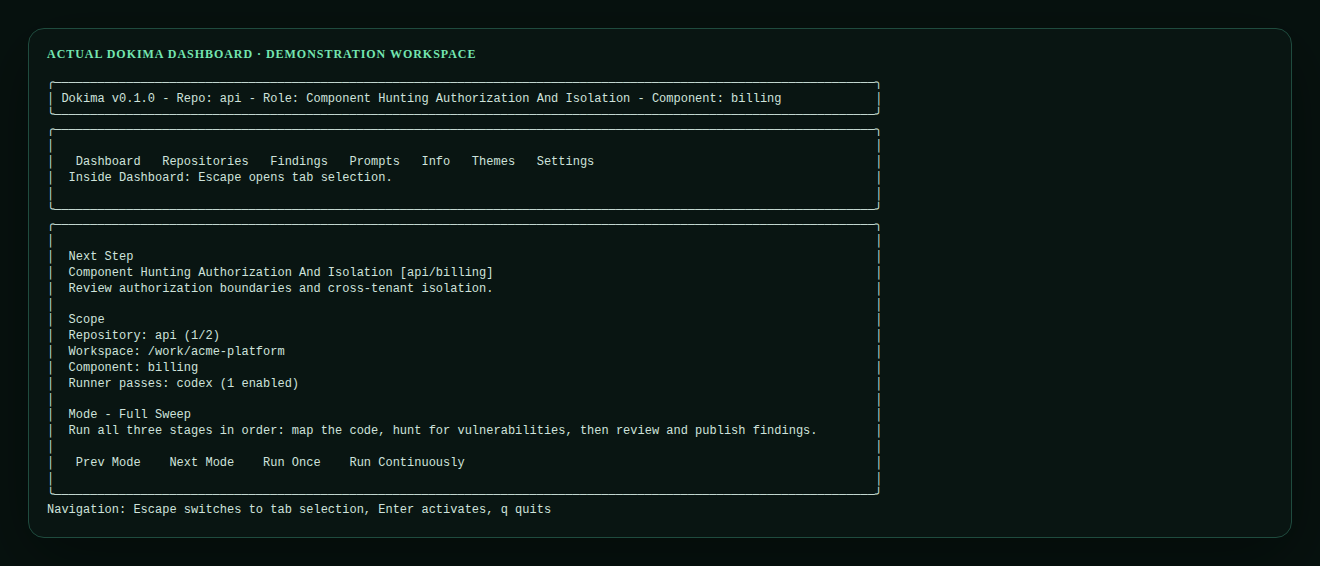
A bounded lifecycle
Each stage has one job.
Dokima separates discovery, challenge, validation and explanation. This keeps the process inspectable and makes it harder for an attractive first answer to become an untested finding.
- 01
Understand
Map repositories, components, trust boundaries and security assumptions so later work starts with context.
- 02
Plan
Choose focused review work for each component rather than spending the same effort everywhere.
- 03
Hunt
Apply specialised security lenses and record candidates with evidence tied back to the source.
- 04
Challenge
Peer-review candidates, ask for missing information and separate plausible issues from weak ones.
- 05
Validate
Check impact, scope and evidence; normalise and deduplicate the findings that remain.
- 06
Explain
Add a plain-English description, detailed remediation and a report developers can work through.
- 07
Repeat
Schedule later passes, revisit assumptions and review changed code without discarding the project history.
Review the review
Findings are challenged before they are presented.
Candidate findings can be peer-reviewed, sent back for more information, validated by severity and deduplicated against overlapping work. Dokima records accepted and rejected runs so the schedule only advances on structured output that passes its checks.
The final report separates confidence from severity and keeps verification reasoning beside the issue. Developers can mark accepted risk, mitigation, false positives, duplicates or items needing human review without rewriting the original evidence.
Choose the right depth
Run the part of the review you need.
Plan and run focused searches for new security issues.
Clean up, validate, expand and report existing findings.
Run the complete lifecycle across due work.
Local control
CLI when you need it. Dashboard when you want the whole picture.
Open the terminal dashboard with dokima, run a single step, complete the next stage or let a full sweep progress through the workspace. The scheduler records its state in .dokima/ and produces a static HTML report you can open locally.
See what Dokima finds
Put an AI security reviewer to work on your codebase.
Start a full-product 21-day trial for your engineering team. No payment card required.